| # Security release process |
| |
| The security release process covers the steps required to plan/implement a |
| security release. This document is copied into the description of the Next |
| Security Release and used to track progress on the release. It contains _**TEXT |
| LIKE THIS**_ which will be replaced during the release process with the |
| information described. |
| |
| ## Security release stewards |
| |
| For each security release, a security steward will take ownership for |
| coordinating the steps outlined in this process. Security stewards |
| are nominated through an issue in the TSC repository and approved |
| through the regular TSC consensus process. Once approved, they |
| are given access to all of the resources needed to carry out the |
| steps listed in the process as outlined in |
| [security steward on/off boarding](security-steward-on-off-boarding.md). |
| |
| The current security stewards are documented in the main Node.js |
| [README.md](https://github.com/nodejs/node#security-release-stewards). |
| |
| | Company | Person | Release Date | |
| | ------------ | --------------- | ------------ | |
| | NearForm | Matteo | 2021-Oct-12 | |
| | Datadog | Bryan | 2022-Jan-10 | |
| | RH and IBM | Joe | 2022-Mar-18 | |
| | NearForm | Matteo / Rafael | 2022-Jul-07 | |
| | Datadog | Vladimir | 2022-Sep-23 | |
| | NodeSource | Juan | 2022-Nov-04 | |
| | RH and IBM | Michael | 2023-Feb-16 | |
| | NearForm | Rafael | 2023-Jun-20 | |
| | NearForm | Rafael | 2023-Aug-09 | |
| | NearForm | Rafael | 2023-Oct-13 | |
| | NodeSource | Rafael | 2024-Feb-14 | |
| | NodeSource | Rafael | 2024-Apr-03 | |
| | NodeSource | Rafael | 2024-Apr-10 | |
| | NodeSource | Rafael | 2024-Jul-08 | |
| | Datadog | Bryan | | |
| | IBM | Joe | | |
| | Platformatic | Matteo | | |
| | NodeSource | Juan | | |
| | Red Hat | Michael | | |
| |
| ## Planning |
| |
| * [ ] 1\. **Generating Next Security Release PR** |
| * Run `git node security --start` inside [security-release][] repository. |
| * This command generates a new `vulnerabilities.json` file with HackerOne |
| reports chosen to be released in the `security-release/next-security-release` |
| folder. |
| * It also creates the pull request used to manage the security release. |
| |
| * [ ] 2\. **Review of Reports:** |
| * Reports can be added or removed using the following commands: |
| * Use the "summary" feature in HackerOne. Example [2038134](https://hackerone.com/reports/2038134) |
| * `git node security --add-report=report_id` |
| * `git node security --remove-report=report_id` |
| |
| * [ ] 3\. **Assigning Severity and Writing Team Summary:** |
| * [ ] Assign a severity and write a team summary on HackerOne for the reports |
| chosen in the `vulnerabilities.json`. |
| * Run `git node security --sync` to update severity and summary in |
| `vulnerabilities.json`. |
| |
| * [ ] 4\. **Requesting CVEs:** |
| * Request CVEs for the reports with `git node security --request-cve`. |
| * Make sure to have a green CI before requesting a CVE. |
| * Check if there is a need to issue a CVE for any version that became |
| EOL after the last security release through [this issue](https://github.com/nodejs/security-wg/issues/1419). |
| |
| * [ ] 5\. **Choosing or Updating Release Date:** |
| * Get agreement on the planned date for the release. |
| * [ ] Use `git node security --update-date=YYYY/MM/DD` to choose or update the |
| release date. |
| * This allows flexibility in postponing the release if needed. |
| |
| * [ ] 6\. **Get release volunteers:** |
| * Get volunteers for the upcoming security release on the affected release |
| lines. |
| |
| * [ ] 7\. **Preparing Pre and Post Release Blog Posts:** |
| * [ ] Create a pre-release blog post using `git node security --pre-release`. |
| * [ ] Create a post-release blog post using `git node security --post-release`. |
| |
| ## Announcement (one week in advance of the planned release) |
| |
| * [ ] 1\. **Publish Pre-Release Blog Post:** |
| * Publish the pre-release blog post on the `nodejs/nodejs.org` repository. |
| |
| * [ ] 2\. **Send Pre-Release Announcement:** |
| * Notify the community about the upcoming security release: |
| |
| * [ ] `git node security --notify-pre-release` |
| Except for those noted in the list below, this will create automatically the |
| issues and emails needed for the notifications. |
| * [docker-node](https://github.com/nodejs/docker-node/issues) |
| * [build-wg](https://github.com/nodejs/build/issues) |
| * [ ] (Not yet automatic - do this manually) [Google Groups](https://groups.google.com/g/nodejs-sec) |
| * Email: notify <oss-security@lists.openwall.com> |
| * [ ] (Not yet automatic - do this manually) Post in the nodejs-social channel |
| in the OpenJS slack asking for amplification of the blog post. |
| |
| ```text |
| Security release pre-alert: |
| |
| We will release new versions of <add versions> release lines on or shortly |
| after Day Month Date, Year in order to address: |
| |
| * # high severity issues |
| * # moderate severity issues |
| |
| https://nodejs.org/en/blog/vulnerability/month-year-security-releases/ |
| ``` |
| |
| We specifically ask that collaborators other than the releasers and security |
| steward working on the security release do not tweet or publicize the release |
| until the tweet from Node.js goes out. We have often |
| seen tweets sent out before the release is |
| complete, which may confuse those waiting for the release and take |
| away from the work the releasers have put into shipping the release. |
| |
| If the security release will only contain an OpenSSL update, consider |
| adding the following to the pre-release announcement: |
| |
| ```text |
| Since this security release will only include updates for OpenSSL, if you're using |
| a Node.js version which is part of a distribution that uses a system |
| installed OpenSSL, this Node.js security update may not concern you, instead, |
| you may need to update your system OpenSSL libraries. Please check the |
| security announcements for more information. |
| ``` |
| |
| ## Release day |
| |
| * [ ] 1\. **Lock down the CI:** |
| * Lock down the CI to prevent public access to the CI machines, ping a member of `@nodejs/jenkins-admins`. |
| |
| * [ ] 2\. **Release:** |
| * Verify the CI is green on all release proposals (test-V8, CITGM, etc). |
| * Follow the [release process](https://github.com/nodejs/node/blob/main/doc/contributing/releases.md). |
| |
| * [ ] 3\. **Unlock the CI:** |
| * Unlock the CI to allow public access to the CI machines, ping a member of `@nodejs/jenkins-admins`. |
| |
| * [ ] 4\. **Publish Post-Release Blog Post:** |
| * Publish the post-release blog post on the `nodejs/nodejs.org` repository. |
| |
| * [ ] 5\. **Notify the community:** |
| * Notify the community that the security release has gone out: |
| * [ ] Slack: `#nodejs-social` |
| * [ ] [docker-node](https://github.com/nodejs/docker-node/issues) |
| * [ ] [build-wg](https://github.com/nodejs/build/issues) |
| * [ ] Email: notify [Google Groups](https://groups.google.com/g/nodejs-sec) |
| * Forward to <oss-security@lists.openwall.com> |
| |
| ## Post-Release |
| |
| * [ ] 1\. **Merge the Next Security Release PR:** |
| * This involves moving the `vulnerabilities.json` file from |
| `security-release/next-security-release` to the `security-release/YYYY-MM-DD` |
| folder and merging the PR. |
| |
| * [ ] 2\. **Cleanup:** |
| * [ ] `git node security --cleanup`. This command will: |
| * Close PRs and backports. |
| * Close HackerOne reports: |
| * Close Resolved |
| * Request Disclosure |
| * Request publication of H1 CVE requests |
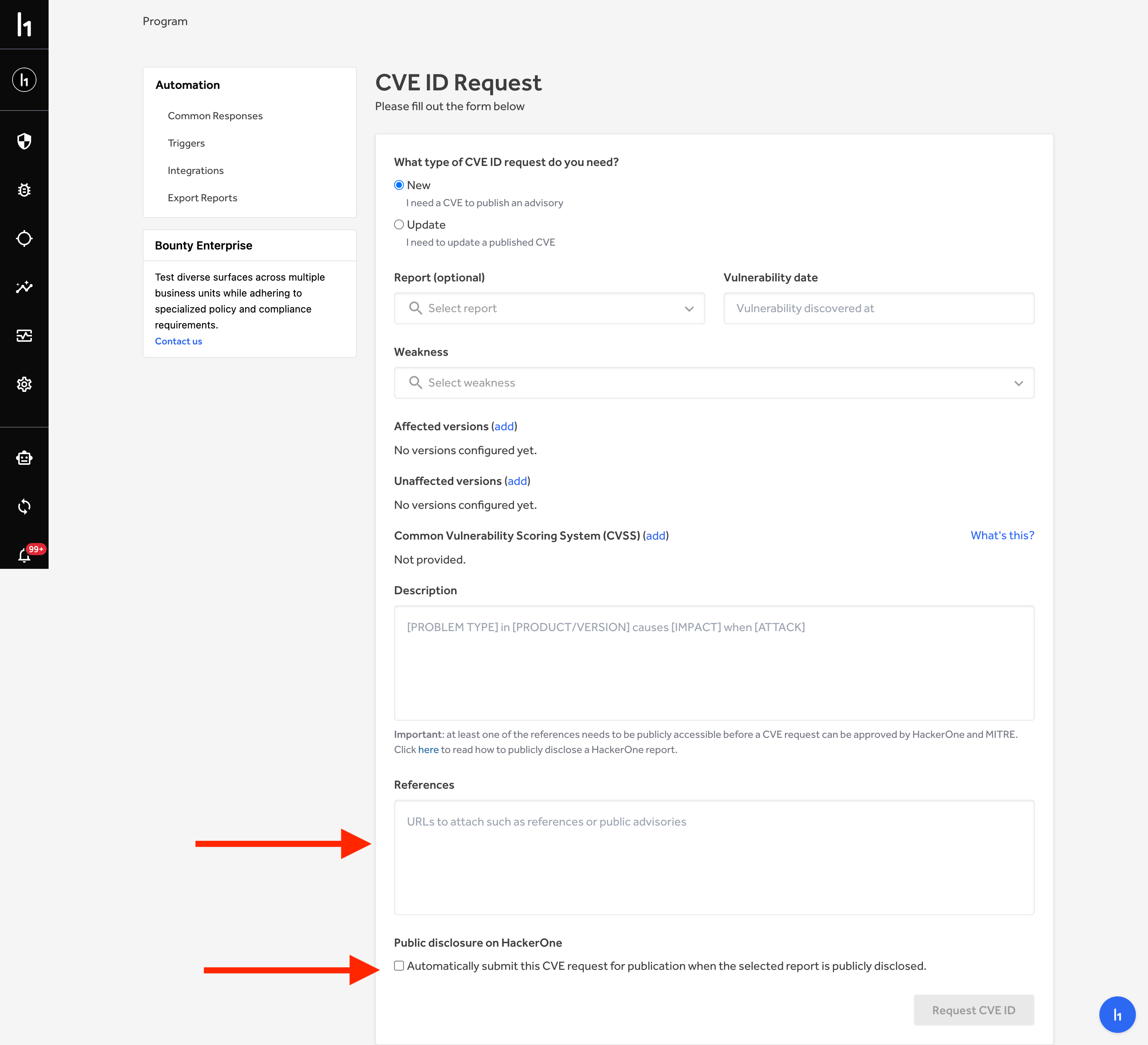
| * In case the reporter doesn't accept the disclosure follow this process: |
| Remove the original report reference within the reference text box and |
| insert the public URL you would like to be attached to this CVE. |
| Then uncheck the Public Disclosure on HackerOne box at the bottom of the |
| page. |
|  |
| * [ ] PR machine-readable JSON descriptions of the vulnerabilities to the [core](https://github.com/nodejs/security-wg/tree/HEAD/vuln/core) |
| vulnerability DB. |
| * [ ] Add yourself as a steward in the [Security Release Stewards](https://github.com/nodejs/node/blob/HEAD/doc/contributing/security-release-process.md#security-release-stewards) |
| |
| ## Adding a security revert option |
| |
| Breaking changes are allowed in existing LTS lines in order to fix |
| important security vulnerabilities. When breaking changes are made |
| it is important to provide a command line option that restores |
| the original behaviour. |
| |
| The existing Node.js codebase supports the command line |
| option `--security-revert` and has the boilerplate to make additions |
| for a specific CVE easy. |
| |
| To add an option to revert for a CVE, for example `CVE-2024-1234` |
| simply add this line to |
| [`node_revert.h`](https://github.com/nodejs/node/blob/main/src/node_revert.h) |
| |
| ```c |
| XX(CVE_2024_1234, "CVE-2024-1234", "Description of cve") |
| ``` |
| |
| This will allow an easy check of whether a reversion has been |
| requested or not. |
| |
| In JavaScript code you can check: |
| |
| ```js |
| if (process.REVERT_CVE_2024_1234); |
| ``` |
| |
| In C/C++ code you can check: |
| |
| ```c |
| IsReverted(SECURITY_REVERT_CVE_2024_1234) |
| ``` |
| |
| From the command line a user can request the revert by using |
| the `--security-revert` option as follows: |
| |
| ```console |
| node --security-revert=CVE-2024-1234 |
| ``` |
| |
| If there are multiple security reverts then multiple instances |
| of --security-revert can be used. For example: |
| |
| ```console |
| node --security-revert=CVE-2024-1234 --security-revert=CVE-2024-XXXX |
| ``` |
| |
| ## When things go wrong |
| |
| ### Incomplete fixes |
| |
| When a CVE is reported as fixed in a security release and it turns out that the |
| fix was incomplete, a new CVE should be used to cover subsequent fix. This |
| is best practice and avoids confusion that might occur if people believe |
| they have patched the original CVE by updating their Node.js version and |
| then we later change the `fixed in` value for the CVE. |
| |
| ### Updating CVEs |
| |
| The steps to correct CVE information are: |
| |
| * Go to the “CVE IDs” section in your program |
| sections (<https://hackerone.com/nodejs/cve_requests>) |
| * Click the “Request a CVE ID” button |
| * Enter the CVE ID that needs to be updated |
| * Include all the details that need updating within the form |
| * Submit the request |
| |
| [security-release]: https://github.com/nodejs-private/security-release |
